
Intermediate workshop
AI-Assisted Development Foundations
Master the principles behind AI code generation and build a context ecosystem that works with any AI coding assistant.
Learn more
Legacy applications can become a significant constraint for large organizations when outdated technology starts to block strategically important initiatives. As the technology ages, the software gets harder to maintain and evolve, and modernizing it takes engineering time, resources, and careful handling of the business-critical behavior built up over years.
We have already seen the impact AI-assisted development can have on large-scale software migrations. In a previous enterprise migration, we achieved a 95% reduction in estimated development effort, from 7,200+ to approximately 360 man-days. (Curious? Read the design system migration case study.)
This time, we tested AI-assisted development on legacy UI modernization. Could AI migrate an existing Java UI to modern Angular without losing the behavior users depend on, and could we prove it?
Our proof of concept showed that it can. One engineer, working with AI agents, migrated a small open-source JavaFX application to Angular 21 in under half a day, from brief to finished repository. We turned each behavior of the original into a numbered requirement with its own test, then checked the result against the live backend.
But generating the new application is only part of the challenge. The critical part is validation: understanding the old technology well enough to establish what the existing application actually does, and understanding the new technology well enough to preserve that behavior while bringing the application up to modern web standards. AI can accelerate the conversion, but engineering expertise is what makes the result trustworthy.
The sample was intentionally small. Its purpose was not to demonstrate enterprise-scale migration, but to prove the approach and understand what a reliable AI-assisted migration process needs to contain.
The first decision is what does not move. The Java backend and its API stay exactly as they are. Only the UI is replaced.
That rule does three things. It turns a rewrite into a frontend build against stable endpoints, which is a much smaller problem. It protects the backend's other consumers and the business logic that nobody wants to reopen. And it defines what correct means: the new UI is correct when it behaves like the old one against a backend nobody is allowed to change.
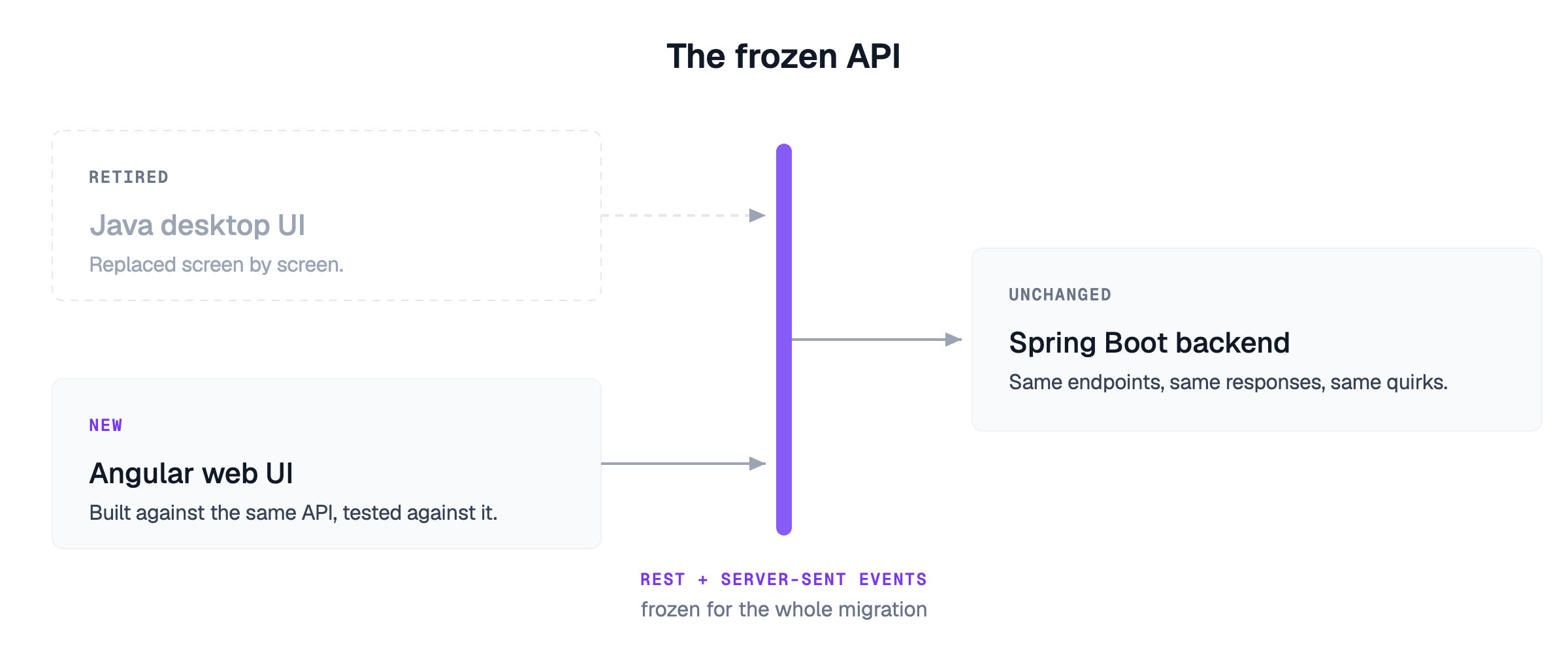
In the sample, that backend was Spring Boot 2.6 on Java 17, serving REST endpoints and a server-sent-events stream. It was not touched, and it did not need to be. Whether a real portfolio's backends are that clean is a separate question, but the rule holds either way: if the new UI seems to need an API change, stop and raise it instead of making it.
The old application still runs. Every behavior a user depends on is in the code and can be read out of it.
So the requirements are archaeology. Read the old UI, and write every behavior down as a numbered requirement: which controls exist, what each action does, when a button is enabled, what happens on an error, what the server actually returns. The list has to include the behaviors nobody sees. A connection closed when the user leaves a screen. A server that answers 201200500404
This is where the expertise in the old tech comes in. Someone has to read the Java to know what the Java does.
Desktop Java and a modern web framework are further apart in syntax than in concept.
A view and its event handlers become a component.
A table bound to a model becomes a table bound to reactive state.
A background task with a progress bar becomes an asynchronous call with a loading flag.
The hop back onto the UI thread after a background call disappears, because in the browser the call returns to the thread that made it.
Switching screens becomes routing.
Where the old application used dependency injection, it stays dependency injection.
Some desktop code has no web counterpart at all. Workarounds for problems the browser doesn't have get dropped, not translated, and recognizing them takes someone who knows why they were written.
AI can write the new UI. For the result to be trusted, the process around it has to make "did we actually do this properly" a question with evidence behind it. Four steps, in this order:
Requirements from the old application, numbered, each paired with an acceptance criterion.
Tests before code. One failing test per requirement, failing because the implementation is missing and not for any other reason.
Build until the tests pass. The tests are not modified to get there.
Verify against the live backend, by people who know what the old screen did and what a modern web UI should do, with the results recorded.
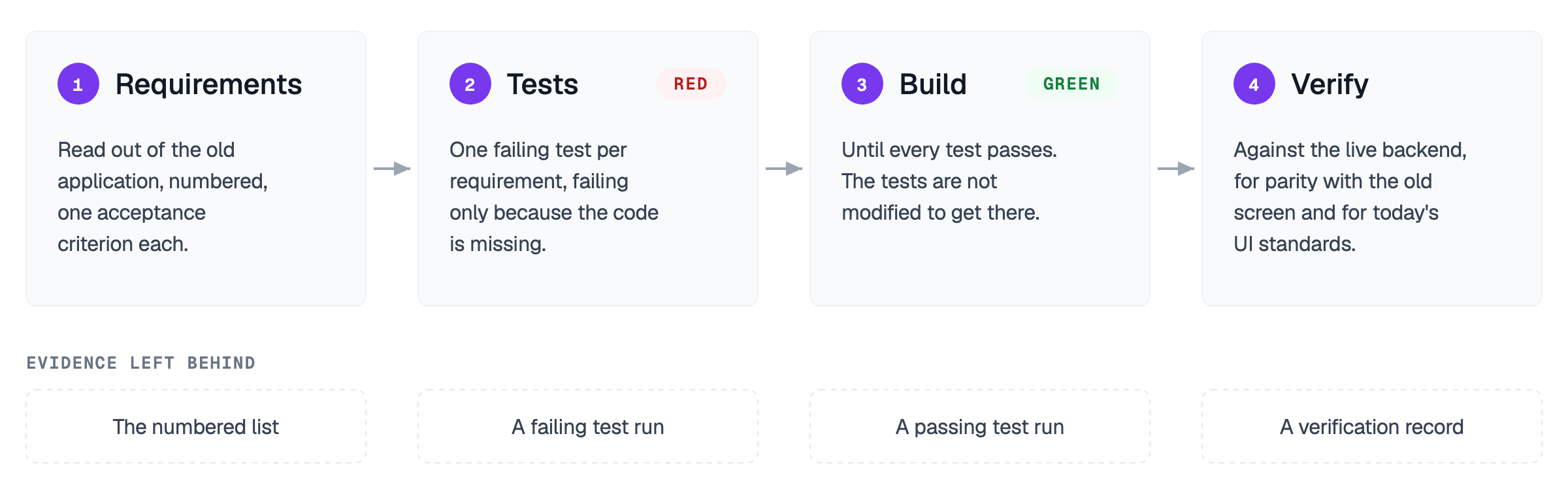
The order matters more than any single step. You cannot claim a passing build without a failing test to have started from, so test-first stops being a guideline and becomes a dependency. And each step leaves evidence behind (the numbered list, a failing test run, a passing test run, a verification record), so the question of whether the process was followed can be answered from that evidence instead of from memory.
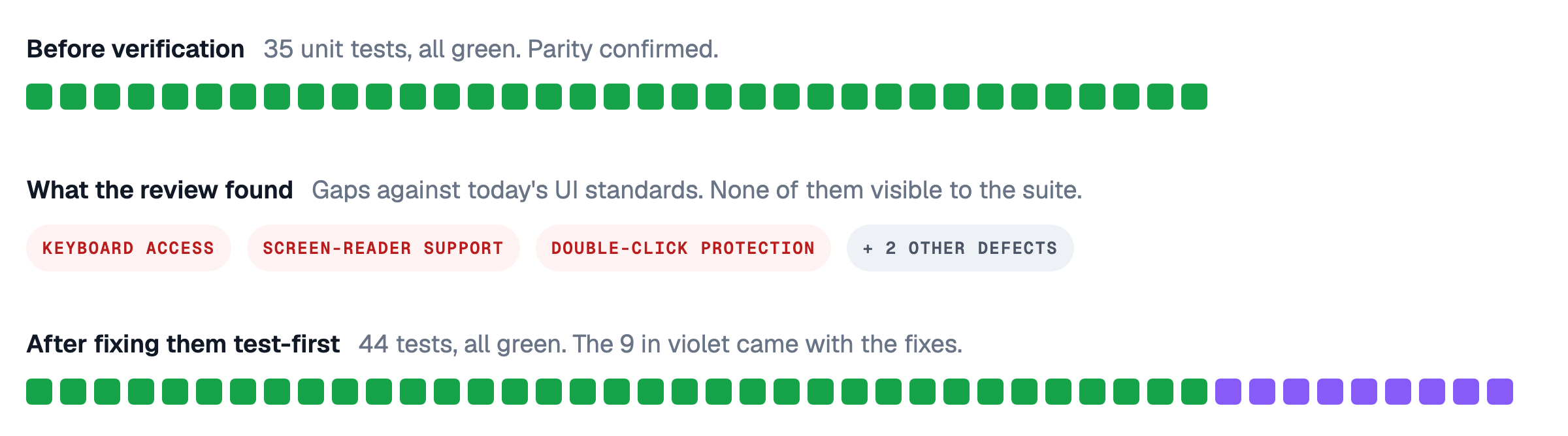
The fourth step is the one we would underline, because it does two jobs. It confirms that the new screen behaves like the old one, and it checks the new screen against today's UI standards, which a desktop application written years ago was never held to. In the sample, one screen reached 35 passing unit tests. Those tests came from the old application's requirements, so they could only confirm parity. A review against modern UI standards then found what they could not: table rows that couldn't be selected from the keyboard, two screen-reader regions announcing every action twice, a button that sent the same request twice on a double-click, and two other defects. Each was fixed test-first. None of these fixes changed what the screen does, only who can use it and how reliably. Green tests prove the port matches the original. Verification is where it becomes a modernization.
The sample proved the concept: an old Java UI can move to Angular with its behavior preserved, checked against the original, and brought up to today's UI standards, ending with a Lighthouse accessibility score of 100.
Everything from the proof of concept is on GitHub, so you can check the result yourself. The javafx-migration-study repository keeps the original JavaFX project and the migrated Angular version side by side, along with the numbered requirements, the tests written from them, and the defects that verification against the live backend found.
The way we ran the proof of concept, one person driving the agents from brief to repository, won't work for a large portfolio. The four steps stay the same. What a portfolio adds is the organization around them:
Agent workflows that are evaluated before they're rolled out
Real project management
A delivery flow that keeps applications moving through the steps
That needs adaptation on both the developer side and the organizational side, and it has to be in place before anything else.
Each application is migrated by the team, working with the agents through the four steps. Because every application is migrated the same way, the process can be tooled: reusable instructions the agents follow for each step, and context-gathering steps that run before any code is written, so each application goes through the same sequence and leaves the same evidence.
Requirements are gathered per application, on the business side and on the technical side. Where the old application has unit tests, part of the technical list can be derived from them.
Validation sits with the original developers, who know what the old screens do. QA runs the same regression cycles against the new Angular application that they run against the old one today.
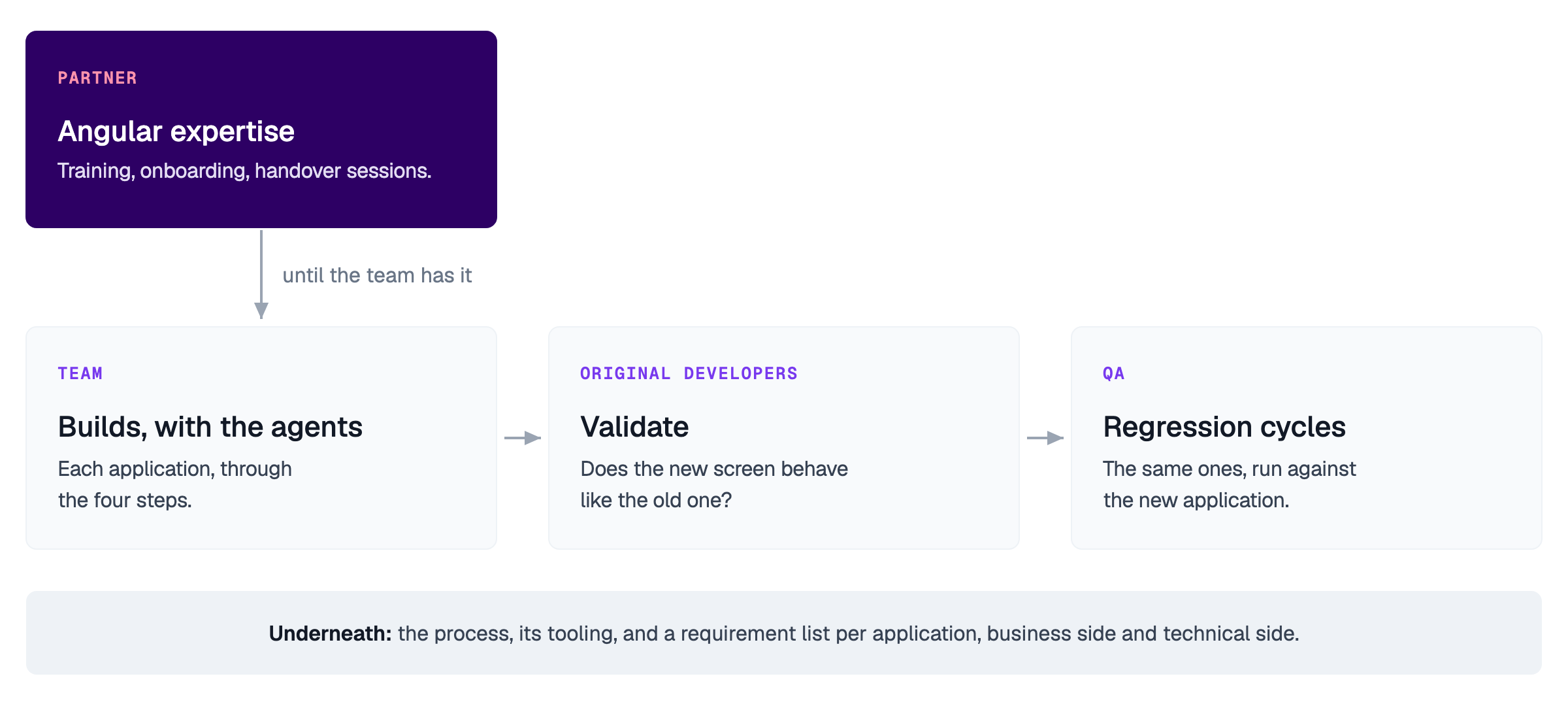
The Angular side is different. A team that hasn't shipped Angular before won't have deep expertise on day one, and hiring for it takes time. Until the team has that depth, we can supply it through training, onboarding, and handover sessions, as long as the team already knows the Angular basics. That expertise also covers the second job of verification, checking the new screens against today's UI standards. What we can't supply is the business side: why the old frontend does what it does is knowledge only its own developers have.
AI can carry much of a legacy UI migration. What makes the result trustworthy is a process that proves it, one application at a time.
At enterprise scale, turning that opportunity into a viable migration strategy requires a repeatable process across applications, teams, and existing technology constraints. The approach we tested provides a starting point for doing that systematically, with evidence and validation built into each migration.
If legacy applications are part of your modernization roadmap, explore the approach with us. We can start with a focused application or workflow, assess the migration constraints, and determine how AI-assisted modernization could work within your existing environment.
Intermediate workshop
Master the principles behind AI code generation and build a context ecosystem that works with any AI coding assistant.
Learn more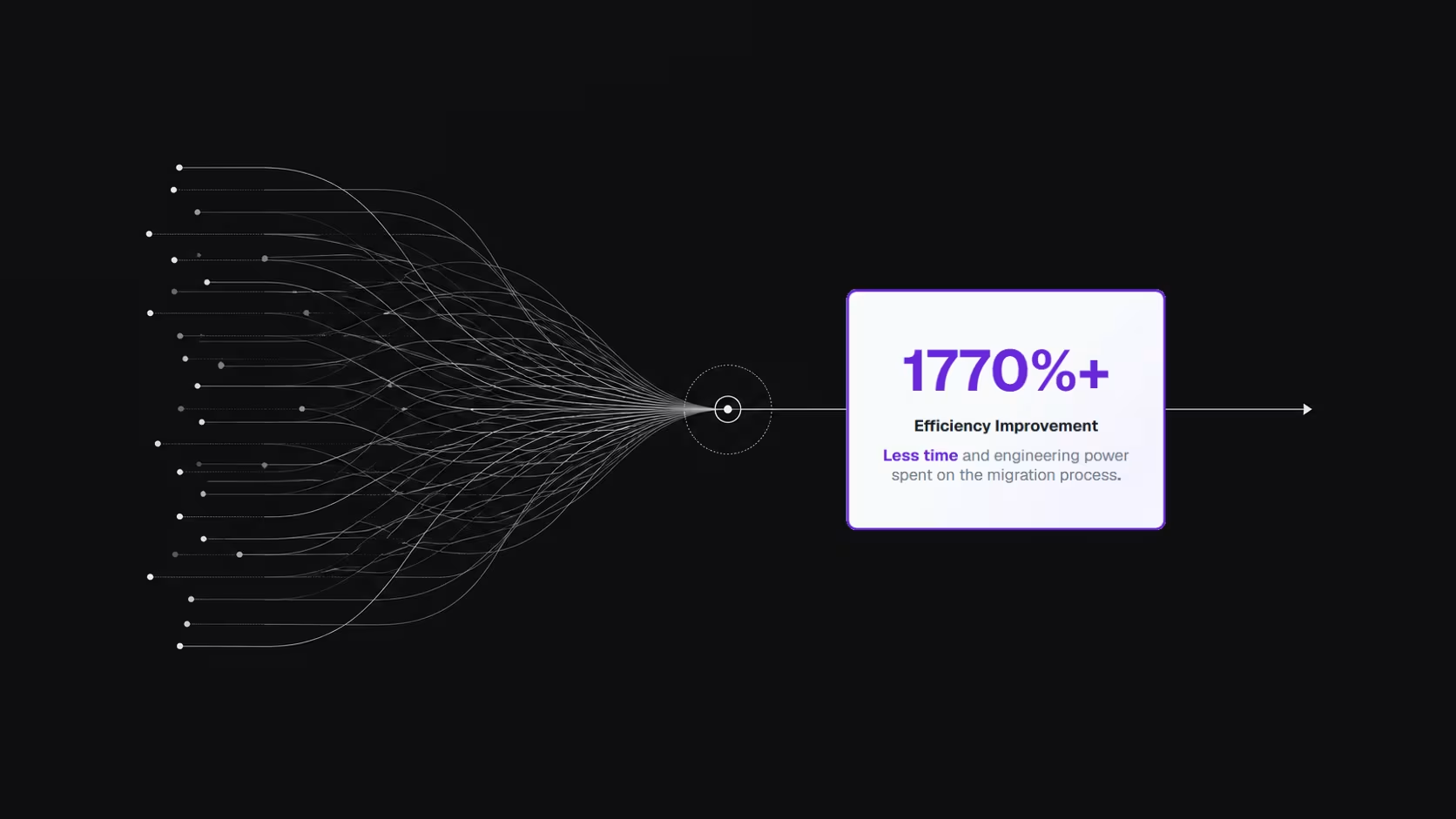
Executing design system migrations in large codebases is often cumbersome and slow - component updates, testing coordination, and knowledge management consuming thousands of man-days.

Discover how we migrated from Husky and lint-staged to Lefthook, reducing Git hook execution time from 116 seconds to just 7 seconds. Learn the migration strategy, benchmarks, and lessons for improving developer productivity.

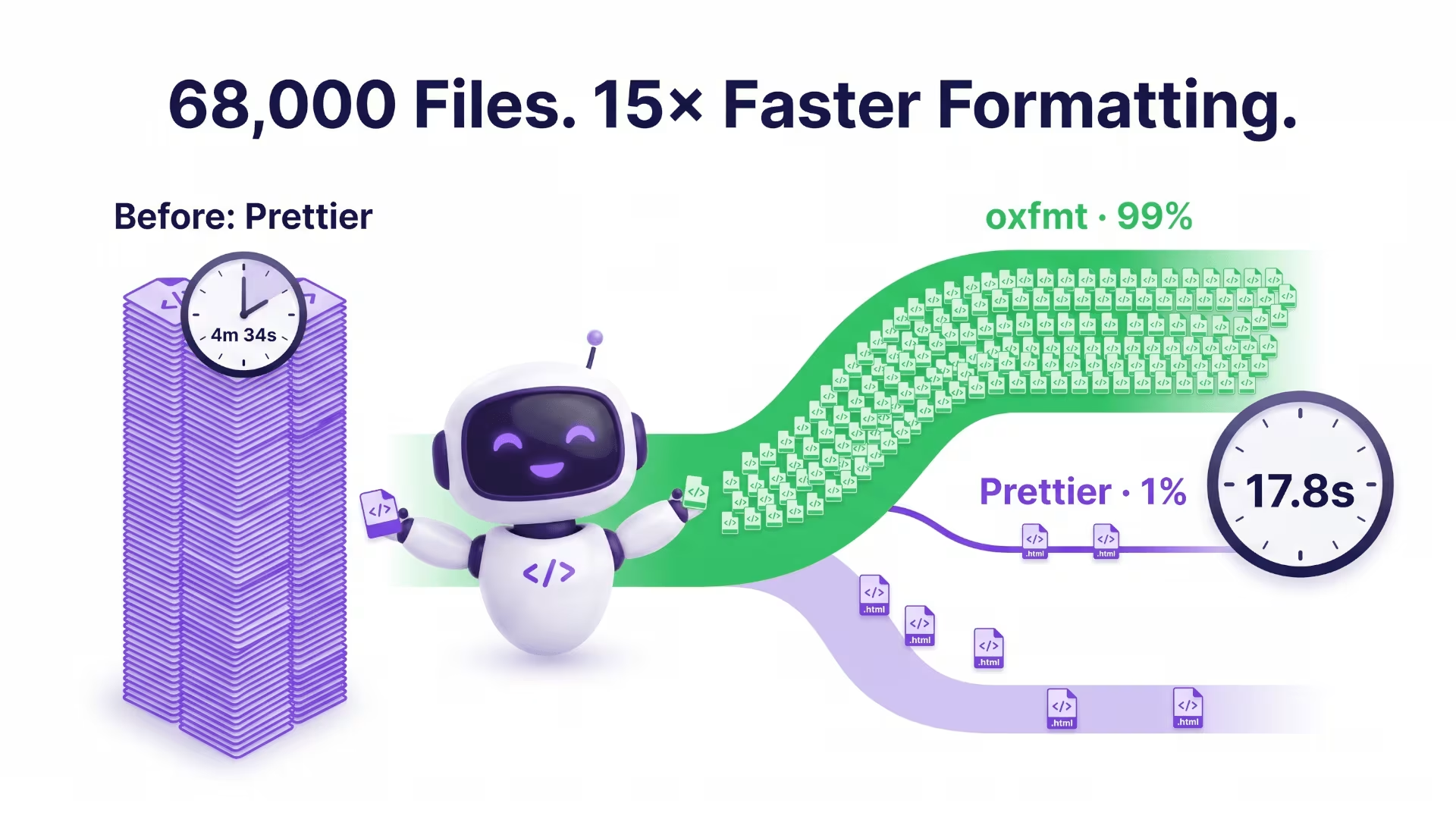
We cut an Nx monorepo’s formatting check from 4m 34s to 17.8s across 68,000 files. Here’s how a hybrid oxfmt and Prettier setup delivered a 15× speedup while keeping Angular templates formatted correctly.