
AI-Assisted Development Foundations
88% of organizations now use AI in at least one business function, yet most remain stuck in the pilot phase — and over half have already experienced negative consequences from AI inaccuracy. Without structured adoption, teams face inconsistent output, hidden security risks, and costly refactoring cycles. The tool is not the problem; the approach is. Understanding the mechanics behind AI code generation is the difference between frustration and flow!
In this workshop, you will uncover the principles that power every AI coding assistant. You will learn why context gets lost mid-conversation, why hallucinations happen, and how to structure your interactions to get reliable and secure results. These fundamentals apply regardless of which tool sits in your editor.
Beyond single prompts, you will explore the different ways to interact with AI: from chat completions and inline suggestions to agent workflows and spec-driven development. Understanding these modes — and when to reach for each — is the difference between fighting your tools and flowing with them.
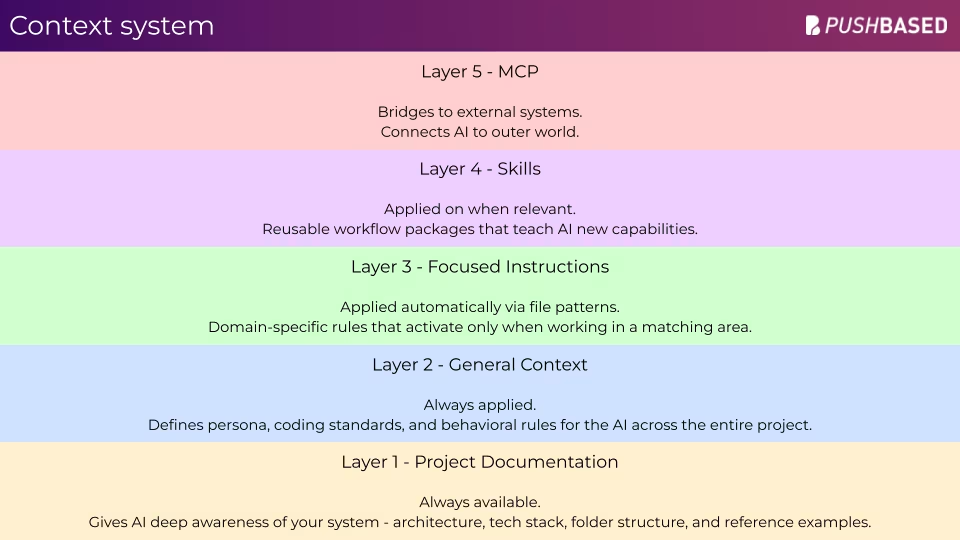
You will build a complete AI context ecosystem for your project: architecture documentation, style guides, context files, instruction configurations, and MCP integrations that connect your AI to external tools and data sources. Following open standards like Agent Skills, this infrastructure stays portable across tools - it doesn't just help you today, it empowers those who come after. The foundations you create improve any assistant's understanding of your codebase - and position you to adapt as tools evolve.
This is a hands-on workshop. You will work through exercises in your own project, building the infrastructure that makes AI-assisted development reliable. No theoretical lectures - you leave with real files you can use immediately.
We break each concept into manageable pieces with exercises that reinforce what you learn.
Prerequisites
Basic development experience in Angular (examples use Angular, but AI concepts apply to any stack)
Familiarity with your preferred code editor
Access to any AI coding assistant (Copilot, Claude Code, Cursor, Windsurf, Kiro, or similar)
No prior AI or machine learning knowledge required
AI Foundations
Tokens & Context Windows - Understand how AI processes and recalls your code
Hallucination Prevention - Identify causes and apply prevention strategies
Security Awareness - Know what data leaves your editor and how to avoid leaking secrets
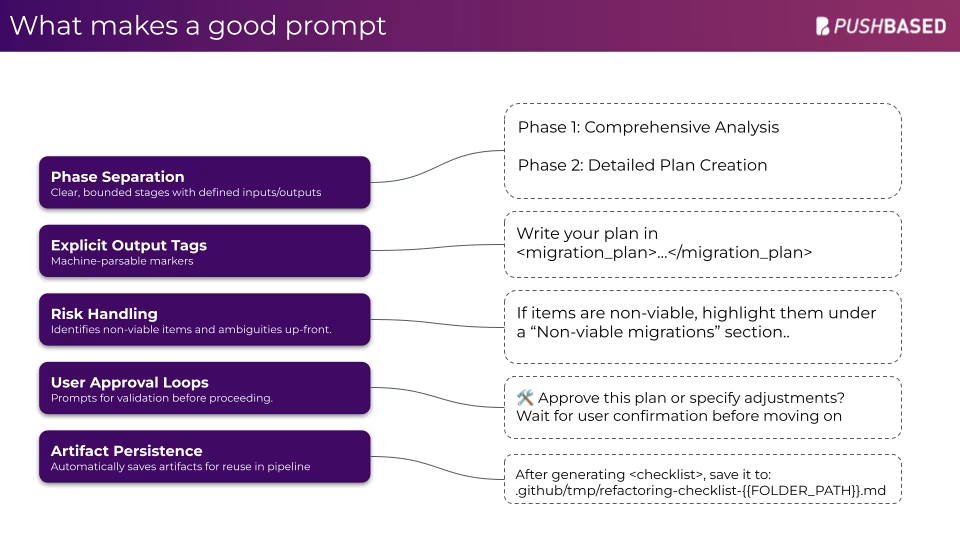
Prompt Design - Design effective prompts that produce consistent, reliable results across tools
Workflows & Context
AI Interaction Modes - Understand the difference between chat, agent, and spec-driven workflows — and when to use each
Documentation Generation - Generate project documentation automatically from your codebase
Style Guides - Capture your team's coding patterns in AI-readable style guides
Context Files - Build context files that give AI deep awareness of your project structure and standards
Tooling & Quality
Instructions & Skills - Configure instruction files and portable skills that shape AI behavior to match your workflow
MCP Integration - Connect external tools and data sources to your AI assistant using MCP (Model Context Protocol)
Quality Gates - Ensure AI-generated code meets the same bar as human-written code before it lands in your codebase
AI-Assisted Development Foundations
AI/LLM Fundamentals ~1.5 hours
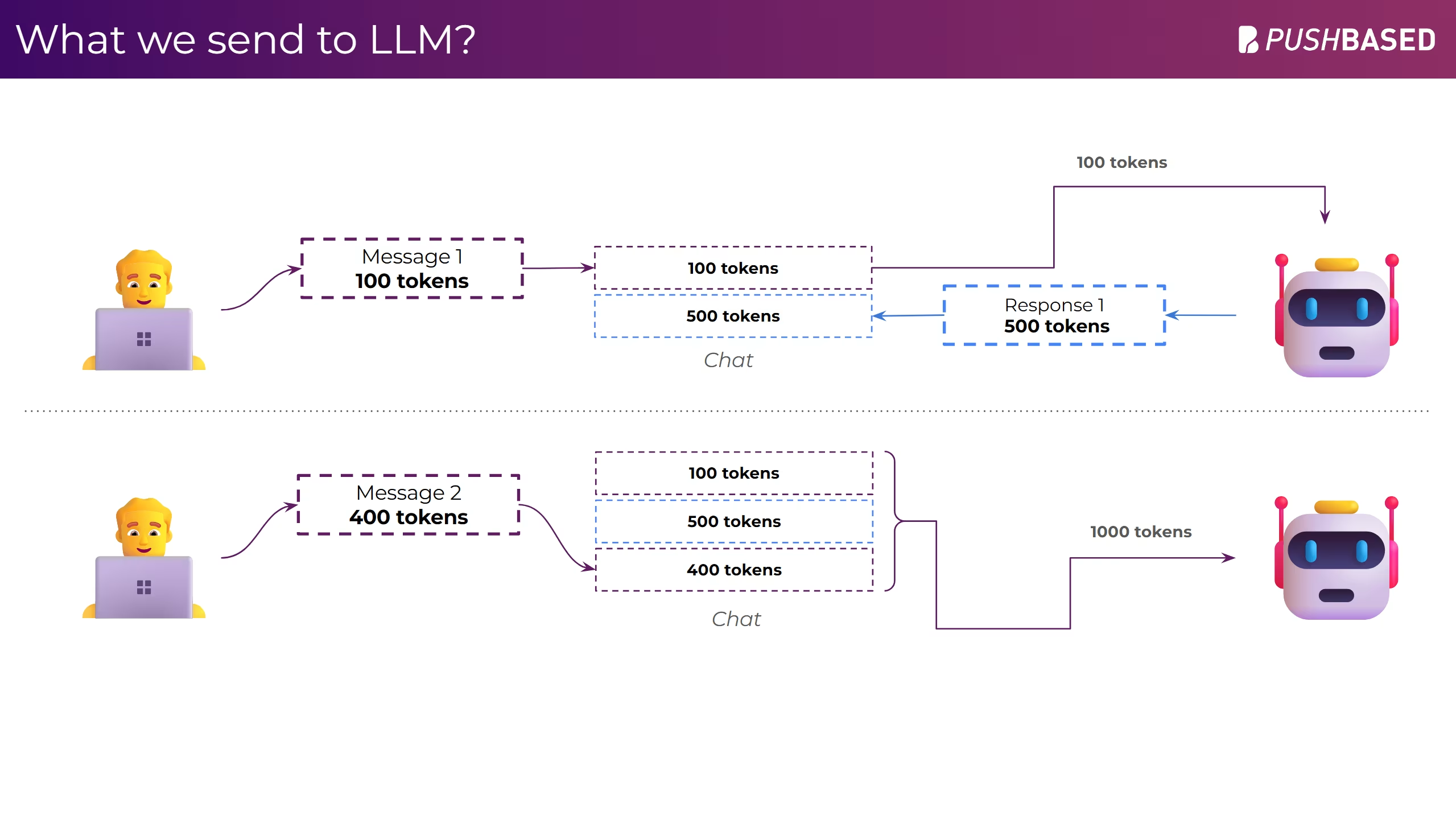
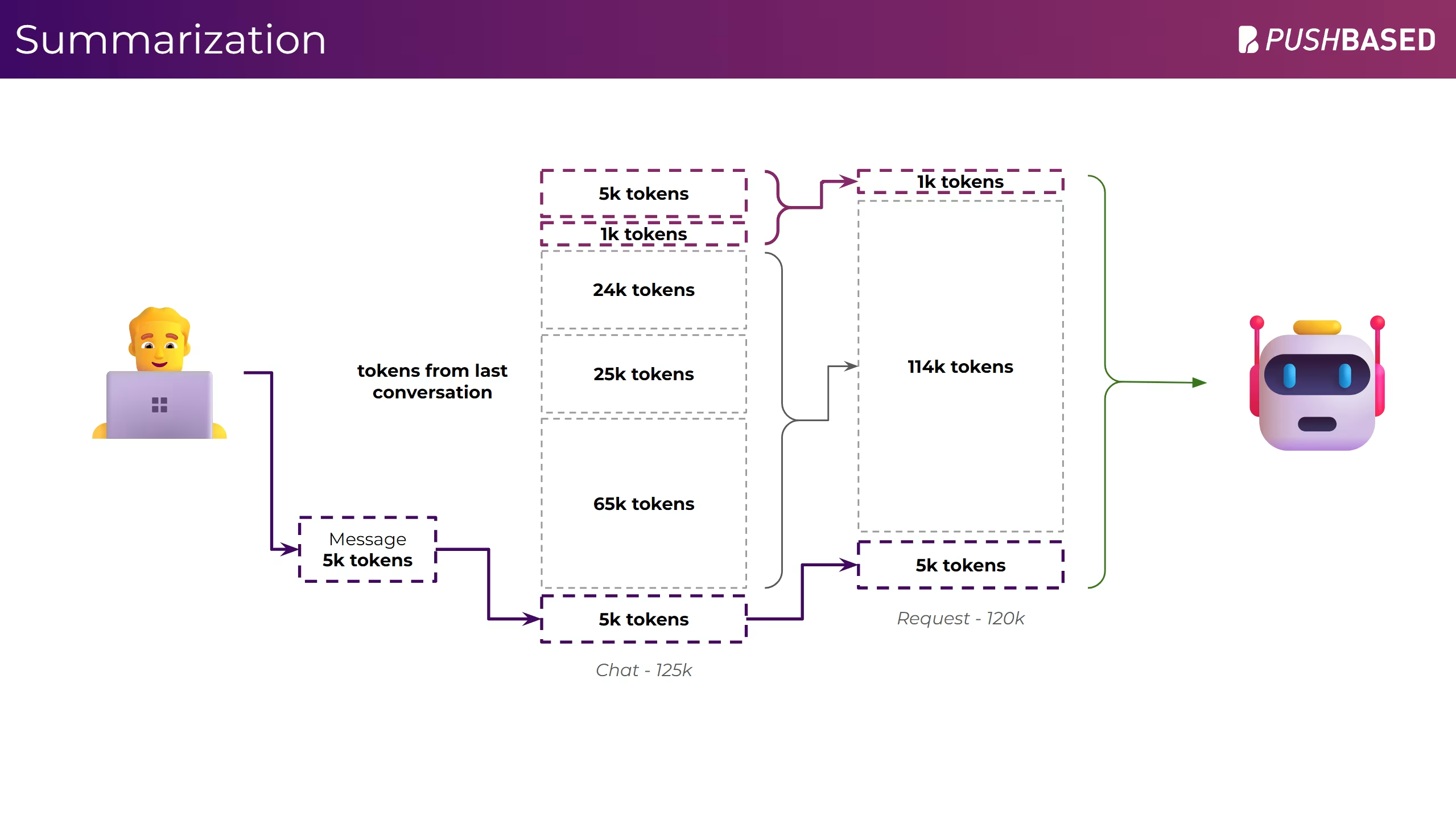
How tokens work and why they matter for every interaction
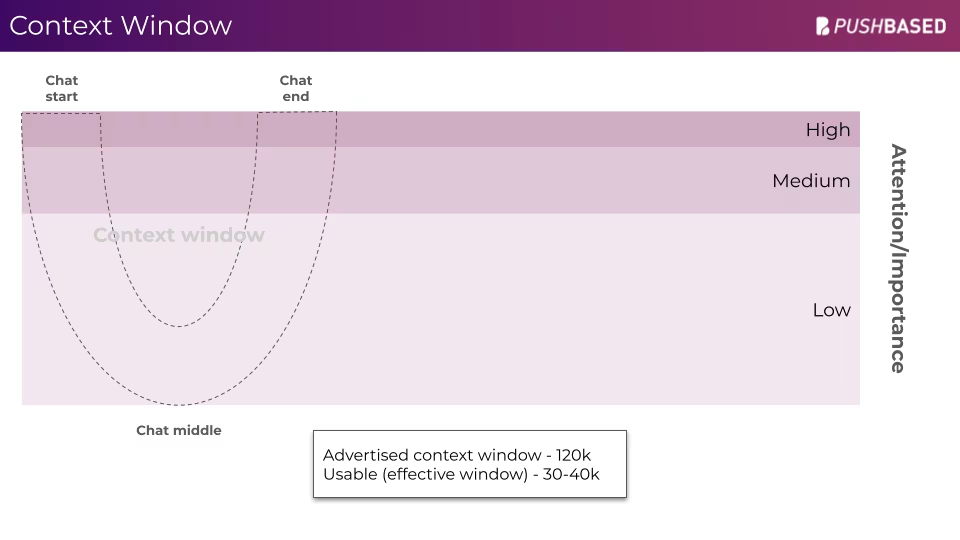
Context windows: what AI remembers, what it forgets, and why
The mechanics behind hallucinations and how to prevent them
Security basics: what data leaves your editor and what to watch out for
Mental models for working effectively with any AI tool
Prompt Engineering & AI Workflows ~1.5 hours
Structuring prompts for consistent, reliable output
Techniques to keep AI on track: edge anchoring, task splitting, critique runs
AI interaction modes: chat completions, agent workflows, and spec-driven development
Applying AI to real tasks: refactoring, debugging, code review, and research
Hands-on: transform vague requests into structured, constraint-based prompts
Context Ecosystem Setup ~1.5 hours
Generating architecture documentation from your codebase
Extracting style guides from existing code patterns
Building the 5-type context file system for project-wide AI awareness
Configuring general and focused instructions that shape AI behavior
Optimizing instruction files for token budgets and pattern specificity
Hands-on: build context files for your own project
Workflows & Validation ~1.5 hours
Configuring MCP to connect external tools and data sources
One-shot implementation: validating your context ecosystem end-to-end
Leveraging AI for test generation and validation
Quality checks for AI-generated code
Preview of the workshop
Meet the trainers

Julian Jandl
 Performance Expert
 Trainer
 Nx Champion

Michael Hladky
 Google Developer Expert
 Microsoft MVP
 Auth0
Auth0- Trainer
- Nx Champion

Enea Jahollari
- Google Developer Expert
- Performance Expert
 Architecture Expert
- Trainer