

Advanced workshop
Architecting Angular Apps for High Performance
High-Speed Angular applications on any device
Learn more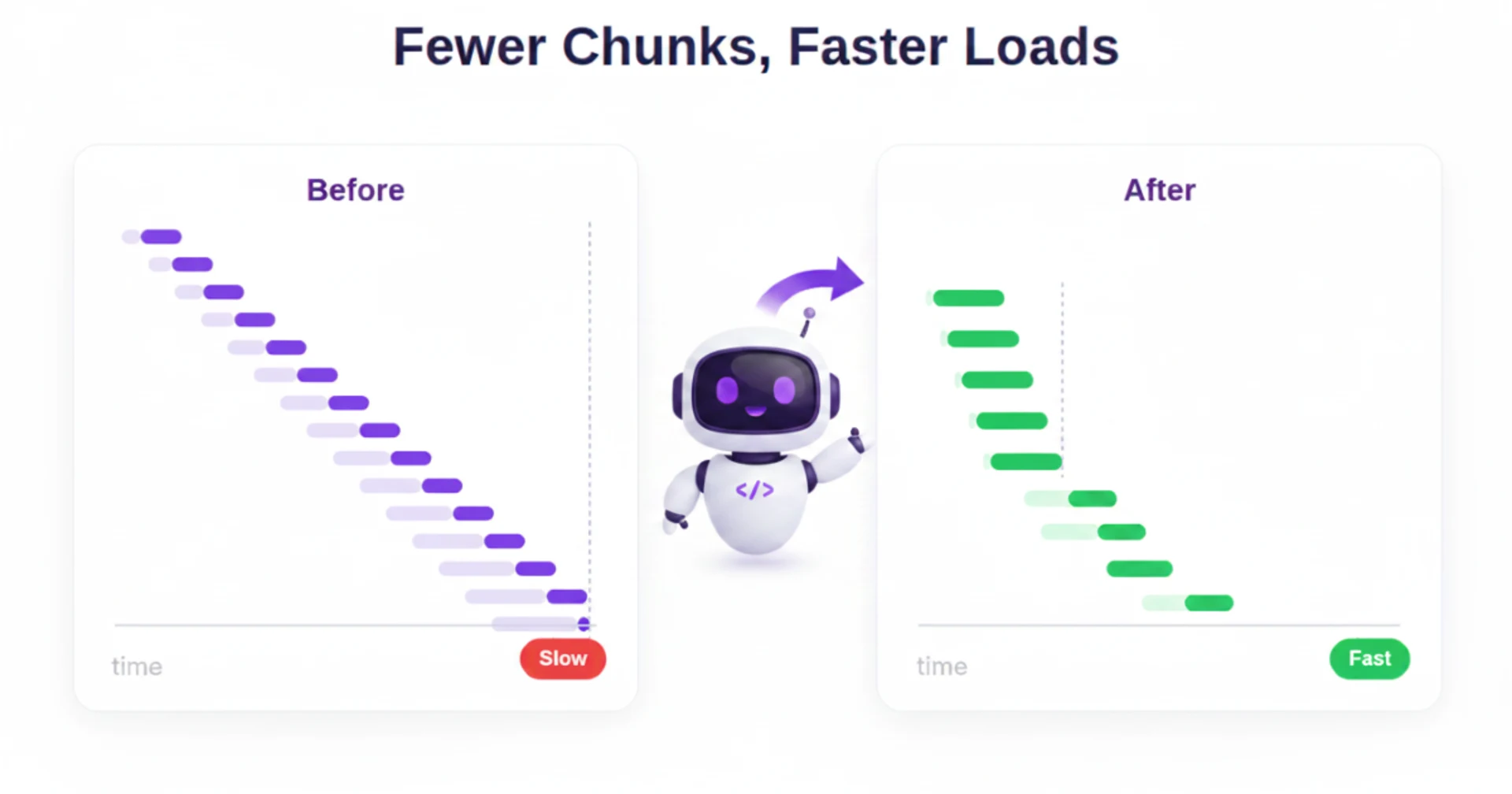
If you’ve migrated a large Angular app to the new build system, you’ve likely noticed the benefits right away: builds and rebuilds are dramatically faster, and the everyday development loop feels much smoother.
But those wins come with a trade-off: the build system is optimized for fast build times, not for the fastest possible loading experience. In larger applications, Esbuild can split the output into a massive number of small JavaScript files. That may look efficient from the bundler’s point of view, but all those extra files add overhead that make the application load slower. In our tests, increasing the number of additional chunks from 0 to 500 pushed LCP from 2.95s to 5.79s, even though the rendered content and total amount of JavaScript stayed roughly the same. This led us to explore how unnecessary bundle fragmentation could be reduced without increasing the amount of JavaScript required for individual user flows.
In this article, we’ll look at:
Why loading more JavaScript files can hurt runtime performance
Why Angular’s new build system produces more Javascript chunks
How those chunks affect real application loading time
How we can optimize the production bundle
Bundlers became mainstream tools largely because of the constraints of the HTTP/1.1’s request model. In that era, browsers could only maintain a small number of parallel connections per origin, (commonly “six connections per origin”). so pages with many assets would hit queuing. On top of that, every extra file repeatedly pays fixed network costs DNS/TCP/TLS handshakes, TCP slow start, and latency overhead that can dominate total load time on mobile networks.
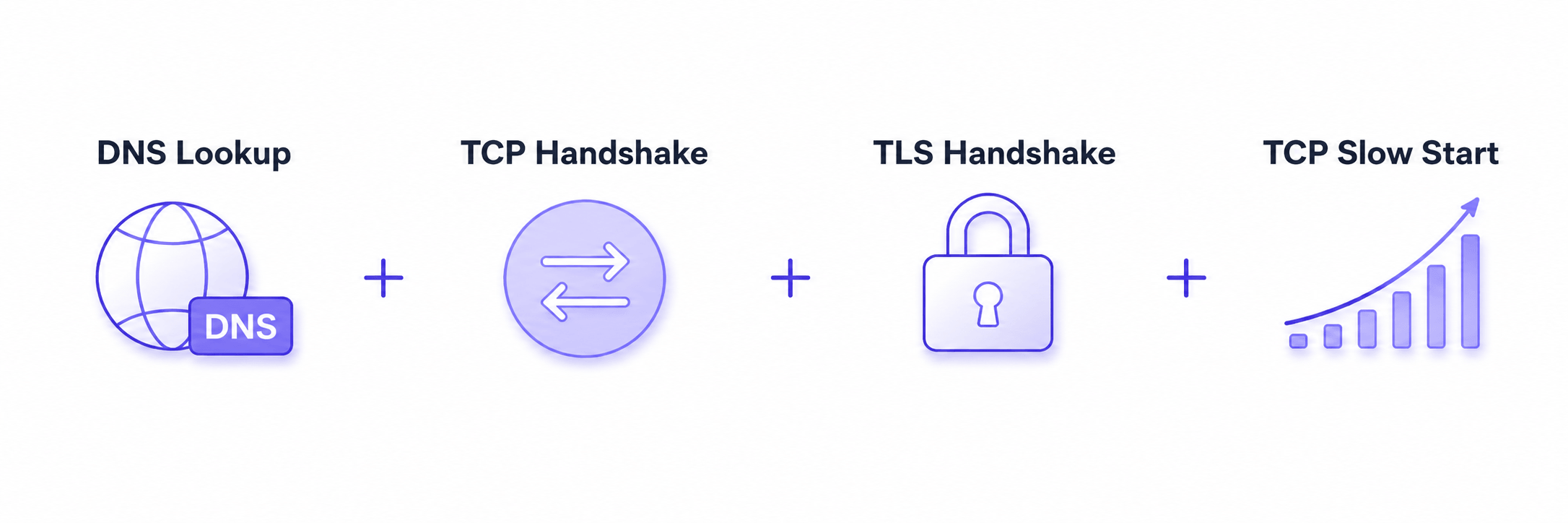
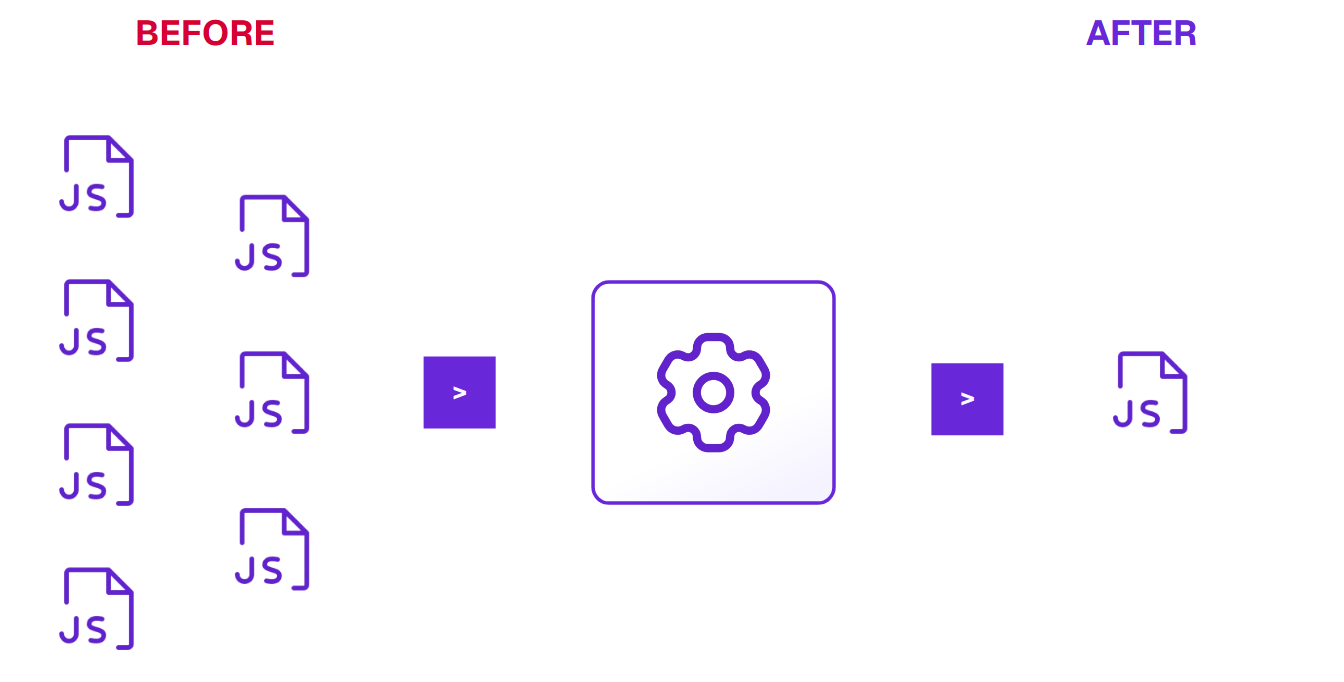
Bundling solved this by taking the application’s dependency graph and collapsing it into a small number of files (the earliest “bundler” was literally just concatenation). Fewer URLs meant fewer opportunities to stall behind per-origin limits and fewer times to pay protocol and handshake overhead, which is why concatenation, spriting, sharding and eventually real JS bundlers became “standard” performance practice in that era.
As the web evolved, applications became increasingly complex and dependent on more and more resources, so HTTP/2 (and later HTTP/3) were introduced to improve how browsers load pages. With HTTP/2, the browser can multiplex many requests over a single connection and signal which responses matter most via stream prioritization—reducing the queuing pressure that previously drove tactics like domain sharding and aggressive bundling. HTTP/3 goes a step further by running HTTP over QUIC, using independent streams to handle lossy or high-latency networks better and, in some cases, speed up connection setup.
However, HTTP/2 and HTTP/3 do not make requests “free.” Each extra file is still extra work for the browser, the server, and the network. This means more requests to manage, more streams to schedule, and more chances that the wrong request gets prioritized. And while multiplexing helps, there are still practical limits on how many streams can run at once. In practice, that limit is often around 100, and once that limit is reached it will wait for active requests to finish before starting new ones.
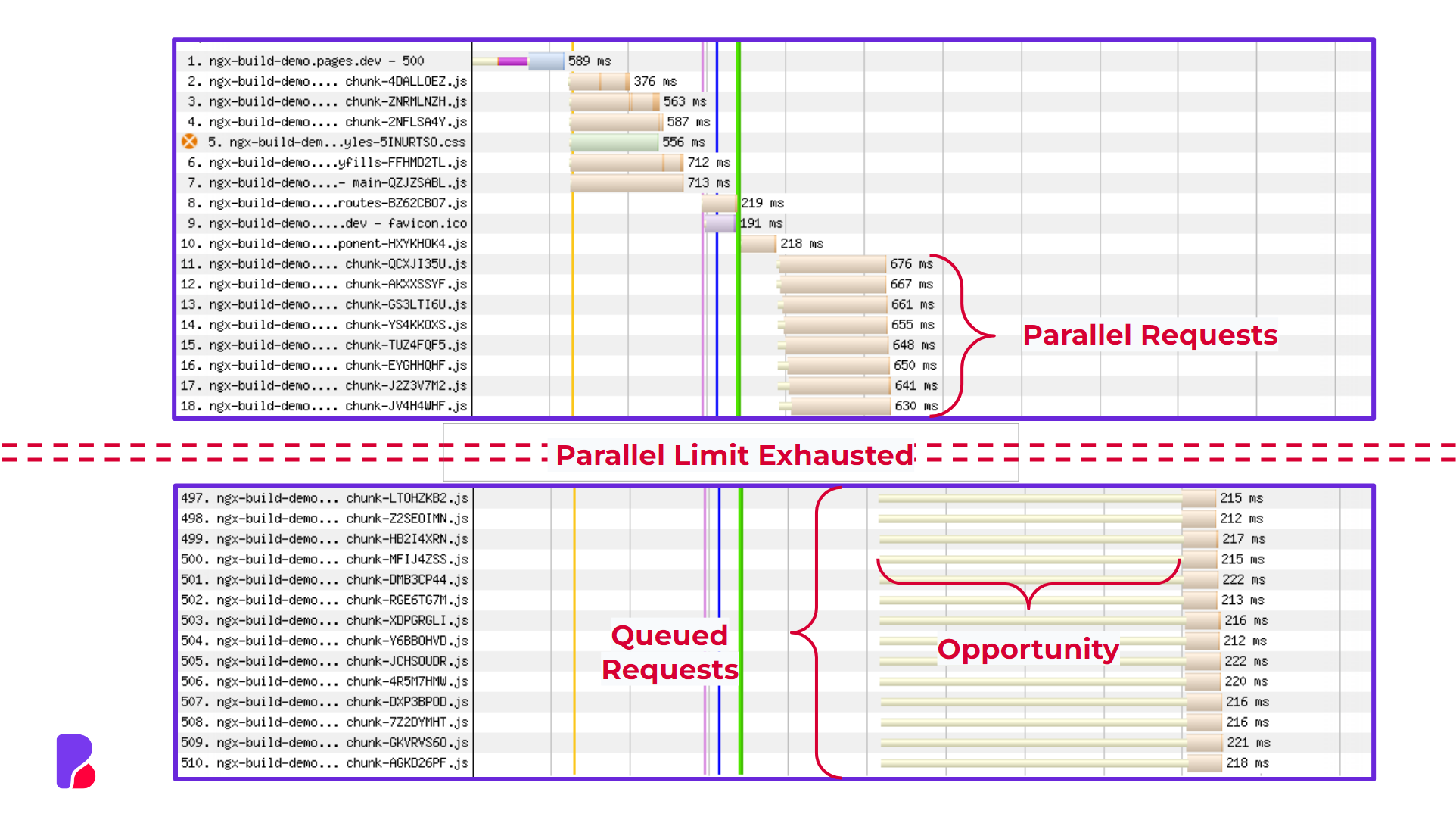
These numbers can vary a lot depending on the full delivery chain the browser (Chrome/Safari/Firefox), the server/CDN configuration (their MAX_CONCURRENT_STREAMS settings), the HTTP version actually negotiated (H2 vs H3), and even the network conditions. The important point isn’t the exact number; it’s that there is a cap, and once you hit it, additional requests start to queue and the waterfall fills up with waiting time. To measure this impact, a small reproducible Angular demo was built where each route renders the same content and loads roughly the same amount of JavaScript, but with a different number of additional chunks. The demo was deployed on Cloudflare and tested with WebPageTest using an iPhone 12 on a 4G emulation. The results show a clear increase in LCP as the number of chunks grows: the baseline route with no extra chunks loaded with an LCP of 2.95s, while 20 extra chunks increased it to 3.24s, 100 to 3.57s, 250 to 4.37s, and 500 to 5.79s. In other words, the route with 500 extra chunks was almost twice as slow as the baseline, even though the rendered content and the total amount of JavaScript stayed roughly the same.
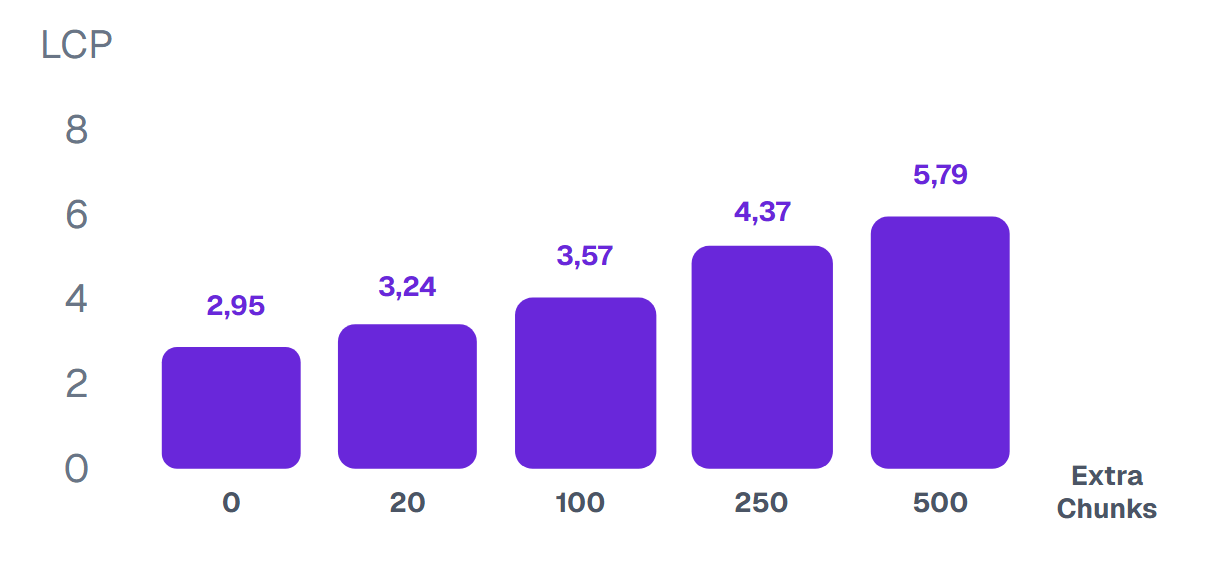
Extra Chunks | LCP | TEST Results |
0 | 2.95 | |
20 | 3.24 | |
100 | 3.57 | |
250 | 4.37 | |
500 | 5.79 |
When migrating to Angular’s new build system, it’s common to see a big jump in the number of JavaScript files. The main reason is esbuild’s code-splitting strategy, which aims to minimize the amount of code needed to load any entry point. In practice, that means every dynamic import (for example, a lazy route) is treated like its own entry point, and Esbuild tries to keep the code for that route as small and self-contained as possible. When you enable named chunks, this becomes obvious—each dynamic import creates a chunk, and then more chunks are created for code shared between multiple lazy chunks.
At first glance, that sounds like a sensible default. But it clashes with how Angular apps actually load: an Angular app usually has one real entry point, and you can’t reach a lazy route without first loading the chunks for its parent route(s). In practice, that means Esbuild is optimizing each lazy chunk as if it might be loaded on its own, even though it never is. The result is a “chunk explosion”: lots of small files and more shared chunks than you’d expect, which then feeds directly into the parallel-request and prioritization limits we discussed above.
To see this overchunking in action we only need a minimal application with a single lazy route:
// main.ts
import { bootstrapApplication } from '@angular/platform-browser';
import { provideRouter, Routes } from '@angular/router';
import { AppComponent } from './app.component';

const routes: Routes = [
  {
    path: 'lazy',
    loadComponent: () =>
      import('./lazy.component').then(
        (m) => m.LazyComponent,
      ),
  },
];

bootstrapApplication(AppComponent, {
  providers: [provideRouter(routes)],
});
// app.component.ts
import { Component } from '@angular/core';
import { RouterLink, RouterOutlet } from '@angular/router';
@Component({
selector: 'app-root',
imports: [RouterLink, RouterOutlet],
template: `<router-outlet />`,
})
export class AppComponent {}
// lazy.component.ts
import { Component } from '@angular/core';

@Component({ template: `<h1>Lazy route</h1>` })
export class LazyComponent {}
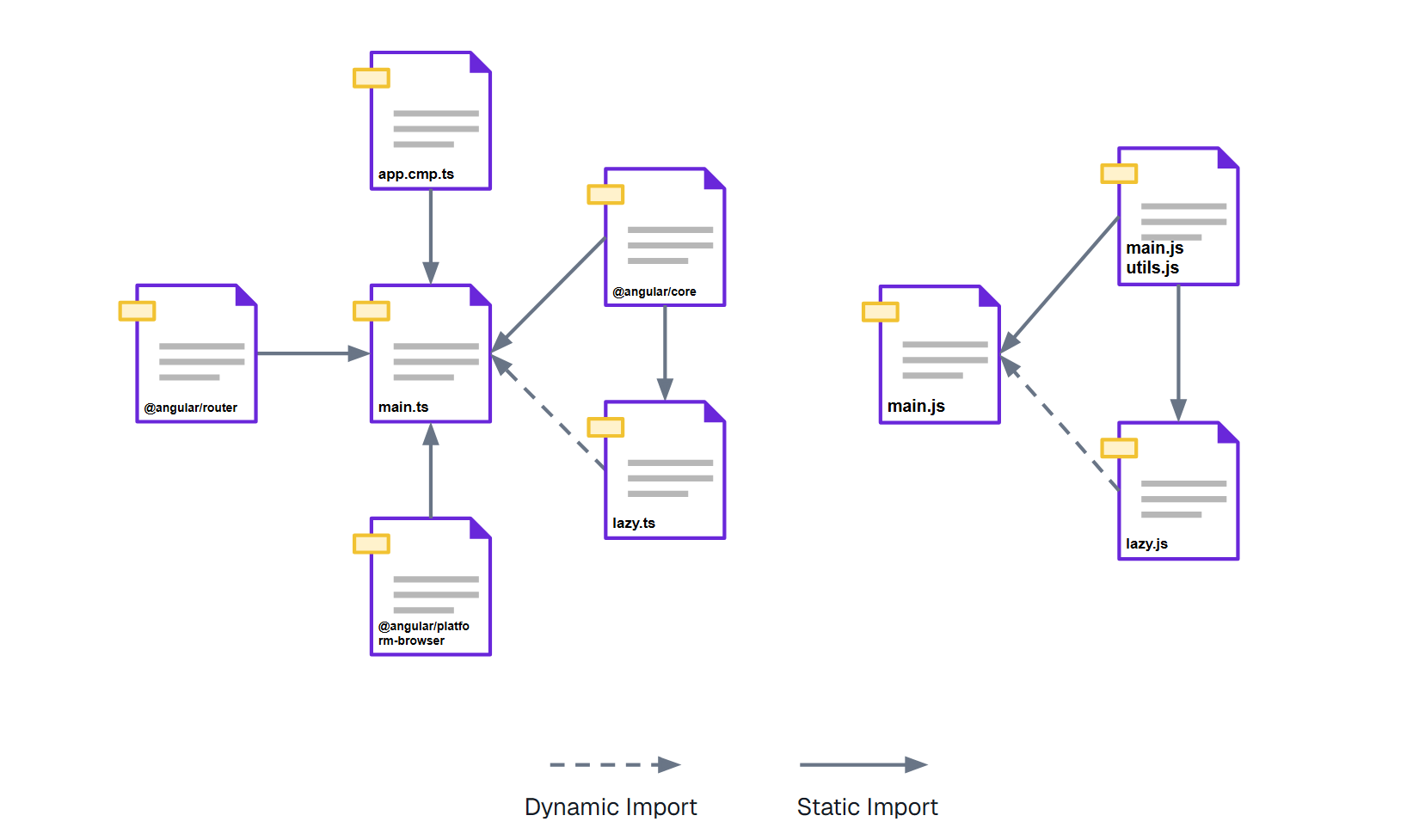
The exact file names are not important. The important part is the graph shape: one application entry point, one lazy boundary, and one shared dependency. Real Angular applications repeat this pattern across many routes, components, directives, pipes, services, and third-party packages.
Unfortunately as explained above the source of the issue is a fundamental part of the Esbuild architecture and as of now there are no plans to solve this in Esbuild itself. It's important to note that Angular deprecated its Webpack toolchain. At the same time there are other bundlers and build systems like RsPack and RsBuild that claim to have equal build time performance as Esbuild. However, new features like HMR and SSR app engine are mainly being developed on the new build system with Vite and Esbuild. Because of this, if you decide to switch to a different bundler which is not officially supported by the angular team it's likely that you will be missing out on some of the newest features.
The team behind Vite (Void 0) has been aware of these issues for a while and built around them in a pragmatic way. Today, Vite uses two different bundlers under the hood, Esbuild for the development server, where speed matters most, and Rollup for production builds, where configurability and output quality are more important. This allows Vite to keep local development extremely fast while still producing a more optimized production bundle.
As a longer-term solution, the Void 0 team has also been developing Rolldown, a new Rust-based bundler. The goal of Rolldown is to combine the flexibility and chunking control of Rollup and webpack with build performance closer to Esbuild.
Angular has started moving in a similar direction. Its experimental chunk optimization feature can rebundle the Esbuild output in memory using the Rolldown API and replace the original bundle with this optimized result. On its own, this can already have a significant impact on the number of chunks produced and the overall shape of the bundle.
This is an important step forward. However, it is still a generic optimization pass, and that means there is often room to improve the output even further.
The main reason Angular’s experimental optimizer cannot fully optimize every application is that it has to remain generic. It cannot make strong assumptions about how a specific application is structured, how its routes are reached, or which features are gated behind configuration or runtime conditions.
But at the moment rebundling happens, we already have access to information that can help us to make better decisions. That information comes from two places: the Esbuild metafile, which describes the generated bundle graph, and application-level knowledge about how different parts of the product are actually loaded.
The Esbuild metafile already contains enough information to push optimization further. It gives us a detailed map of the final bundle: which files ended up in which chunks, and how those chunks are connected through static and dynamic imports. That means we can inspect the actual dependency graph produced by Esbuild and use it to drive a second, more informed bundling step.
Some optimization strategies require application-specific knowledge. For example, route hierarchy, feature flags, or configuration-driven loading behavior can all influence what “good” chunking looks like. Static analysis alone cannot always infer those relationships. But even without that extra context, we can still apply one generic strategy that should improve the output for most large Angular applications.
The idea is simple: reduce the number of chunks as much as possible without increasing the amount of JavaScript that any user flow needs to download.
This is not about blindly merging files together. It is about identifying chunks that are unnecessarily split out in the first place. A chunk that is always reached through another chunk is often not providing much value as a separate file. In practice, it is not independently loadable, so keeping it separate mostly adds overhead: another request, another stream to schedule, and another script for the browser to fetch, parse, and execute.
To detect those cases, we can analyze the bundle graph through reachability and dominance relationships. By traversing the dependency graph, we can determine which chunks are always loaded behind another chunk and which ones are truly independent. Chunks that do not provide meaningful separation can then be merged back into their dominator, reducing fragmentation without making any reachable loading path more expensive.
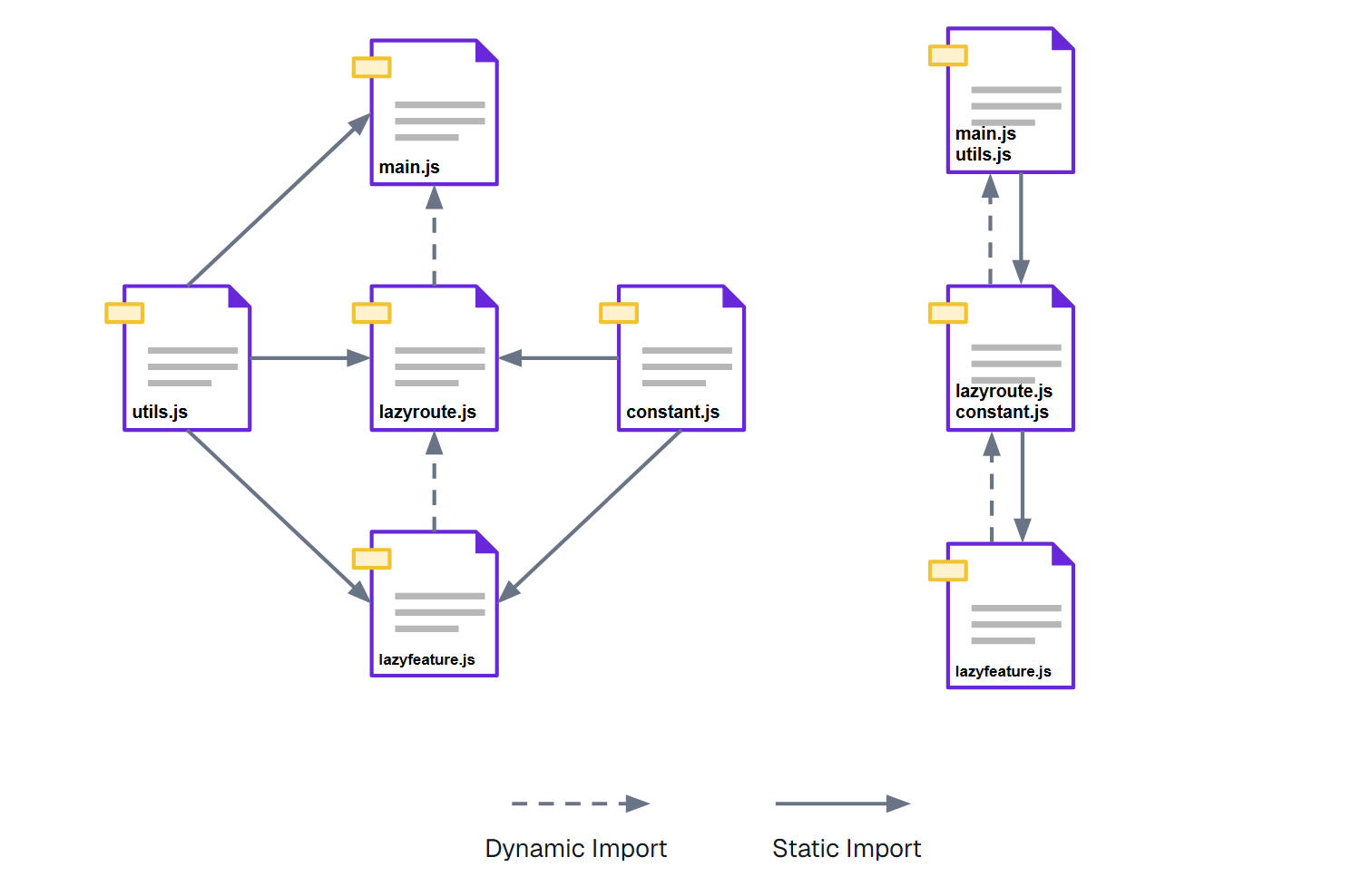
As a general default, this gives us a practical optimization target: minimize the number of chunks while preserving the amount of JavaScript downloaded along every reachable path through the application. For most applications, that already produces a better bundle shape: less fragmentation, fewer requests, and no unnecessary increase in downloaded code.
Application-specific optimization strategies
There are limits to what a generic reachability-based strategy can safely do. It can improve the bundle graph by looking at how chunks reference each other, but it cannot fully understand how your application behaves at runtime.
To go further, the optimizer needs application-specific knowledge.
A common example is a global loader registry. In many large applications, there is a root-level service that stores callbacks for dynamically loading feature modules, widgets, flows, or route-specific functionality.
From the bundle graph’s point of view, this can make it look as if those features are loadable directly from the root of the application:
@Injectable({ providedIn: 'root' })
export class FeatureLoaderRegistry {
  private loaders = {
    checkout: () => import('./checkout/checkout.feature'),
    account: () => import('./account/account.feature'),
    payments: () => import('./payments/payments.feature'),
  };
}
But in the real application, those features may not be reachable from the root at all. They may only be reachable after entering a specific route, enabling a feature flag, selecting a tenant, or going through a particular product flow.
This is where the bundle graph alone becomes misleading. The optimizer sees a dynamic import from a root service and must assume that the chunk can be loaded from the root. But the application developer may know that this is not true.
In these cases, it can make sense to guide the optimizer with additional rules.
For example, an application-specific strategy may instruct the optimizer to ignore certain dynamic references when calculating reachability. Instead of treating a registry import as a real root-level entry point, the optimizer can be told that the feature actually belongs to a specific route or feature area.
Another useful strategy is to group chunks that are commonly loaded together. If two or more entry points always share a set of static dependencies, keeping those dependencies split into many small shared chunks may not provide much benefit. In that case, the optimizer can merge the common dependencies into a single shared chunk for those entry points.
This kind of optimization is much harder to make generically, because the right decision depends on the structure of the application. A chunk that should be shared in one application might be better kept separate in another. The optimizer needs to know whether a dependency is truly reusable across independent user flows, or whether it only appears shared because of how the code is referenced.
In practice, this gives us three levels of optimization:
Reachability optimization A generic default strategy that reduces unnecessary fragmentation without increasing the JavaScript downloaded for any reachable path.
Static closure optimization A strategy that groups the static dependencies of a known entry point when those dependencies are only meaningful inside that entry point’s loading path.
Common dependency optimization A strategy that groups dependencies shared by a known set of entry points, reducing the number of shared chunks when those entry points are commonly loaded together or belong to the same product flow.
The important point is that these strategies are not meant to blindly produce fewer files. They are meant to encode better knowledge about how the application is actually loaded.
A good bundle is not simply the bundle with the fewest chunks. It is the bundle that gives each user flow the right amount of JavaScript, with the least unnecessary scheduling, request, parsing, and execution overhead.
To make these strategies easier to apply in real Angular applications, we created @rx-angular/rebundle.
It is an open-source Esbuild plugin that hooks into the Angular build, reads the generated metafile, and rebundles the resulting chunks in memory before they are written to disk.
The default configuration applies the reachability strategy described above, so you can start using it without defining any custom rules. More advanced applications can configure and combine the available strategies to better match their loading behavior.
For Nx applications, installation and configuration require two commands:
nx add @rx-angular/rebundle
nx g @rx-angular/rebundle:configure --project=my-app
The generator registers the optimizer in the application’s build target:
{
  "targets": {
    "build": {
      "executor": "@nx/angular:application",
      "options": {
        "plugins": ["@rx-angular/rebundle"]
      }
    }
  }
}
Angular CLI’s built-in application builder does not currently expose an Esbuild plugins option. Angular CLI applications can use @angular-builders/custom-esbuild instead:
npm install --save-dev @angular-builders/custom-esbuild
npm install @rx-angular/rebundle
{
  "projects": {
    "my-app": {
      "architect": {
        "build": {
          "builder": "@angular-builders/custom-esbuild:application",
          "options": {
            "plugins": ["@rx-angular/rebundle"]
          }
        }
      }
    }
  }
}
@rx-angular/rebundle is currently experimental, and we're continuing to validate these optimisation strategies against real-world Angular applications. If you're seeing bundle fragmentation or unexpected loading performance regressions after moving to Angular's new build system, we'd be interested in comparing findings and understanding how the problem shows up in your application.
You can find the complete installation guide, configuration options, and strategy documentation in the @rx-angular/rebundle documentation.
Bundle optimization is just one piece of the puzzle. Our Angular Performance Workshop teaches the patterns, architecture, and performance techniques behind fast, scalable Angular applications.
Advanced workshop
High-Speed Angular applications on any device
Learn more
Find what slows your web app with an expert performance audit. Give your engineering team prioritized fixes for Core Web Vitals, bundle size and memory leaks.
Learn more
Discover how we migrated from Husky and lint-staged to Lefthook, reducing Git hook execution time from 116 seconds to just 7 seconds. Learn the migration strategy, benchmarks, and lessons for improving developer productivity.

Executing design system migrations in large codebases is often cumbersome and slow - component updates, testing coordination, and knowledge management consuming thousands of man-days.