
Intermediate workshop
Nx for Scalable Architecture
Master Nx to enforce architecture, speed up your development workflow and improve code quality
Learn more
In Part 1, we introduced incremental hydration in Angular, an advanced feature that optimizes how and when Angular components hydrate on the client. In this article, we’ll explore why this approach is so important for performance and user experience, focusing on its impact on key metrics like Largest Contentful Paint (LCP), Interaction to Next Paint (INP), and Cumulative Layout Shift (CLS).
Boosts LCP: Pre-rendered content arrives faster, giving users something meaningful to see almost immediately.
Improves INP: The deferring of JavaScript execution keeps the main thread available to handle user interactions, reducing delays.
Minimizes CLS: By taking over existing DOM elements rather than replacing them, Angular drastically reduces or eliminates altogether unexpected layout shifts.
These three metrics are part of Core Web Vitals, which collectively measure the user’s perception of loading speed, responsiveness, and visual stability.
Largest Contentful Paint (LCP) measures how long it takes for the largest visible element on a page to fully render after a user requests it. You can think of it as a film strip where each frame represents a rendered state of the page until the largest content element appears.
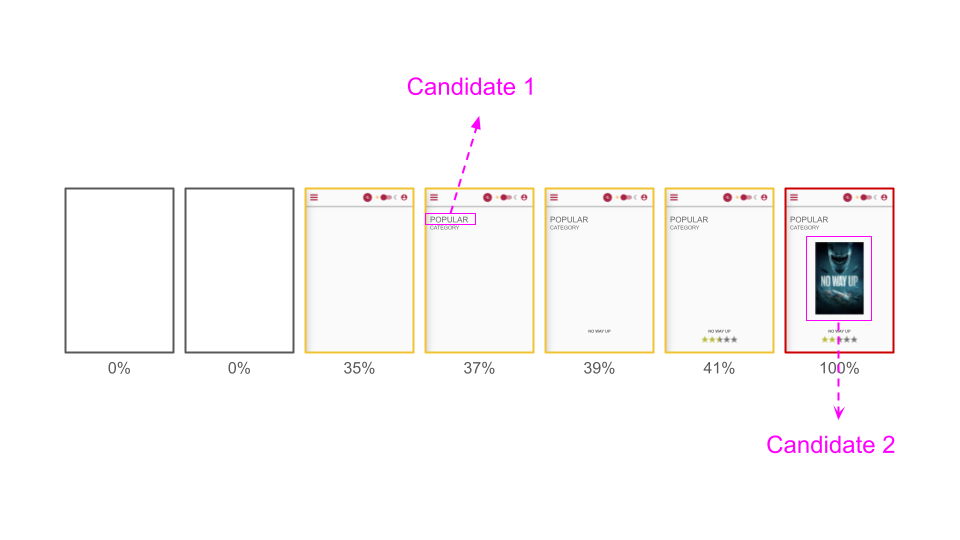
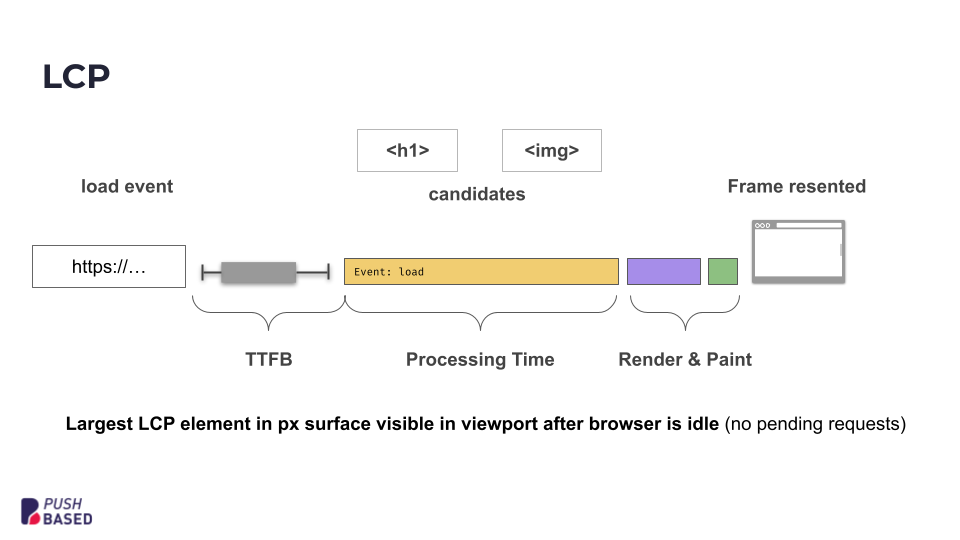
A typical loading sequence involves:
Requesting the page
Sending the document to the client
Parsing and executing the document
Browser layout
Browser paint
LCP candidates
Final frame
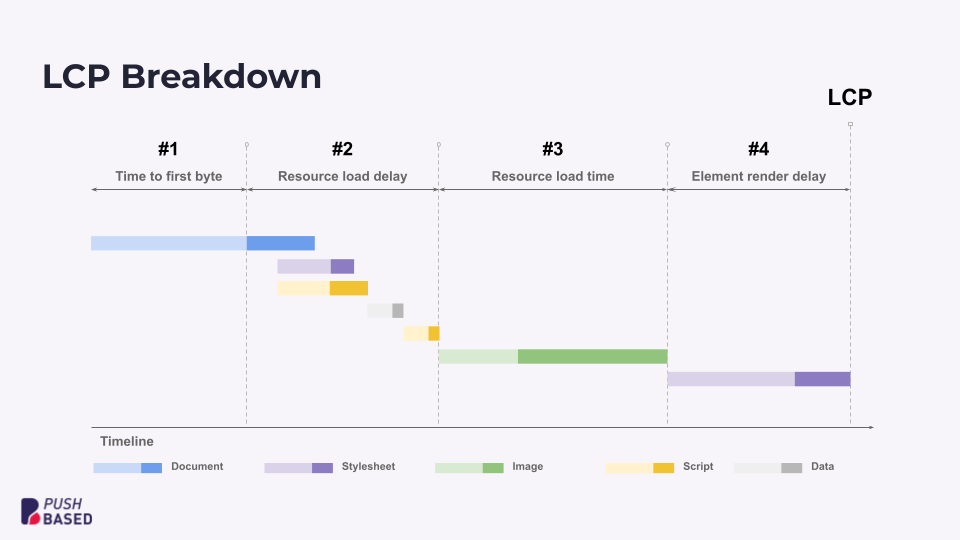
With so much happening behind the scenes, it’s not always clear where to focus your optimization efforts. One useful approach is an LCP breakdown, which highlights four main sections in the load cycle. By targeting improvements in these areas, you can see noticeable gains in LCP.
Angular’s server-side rendering (SSR), pre-rendering, and incremental site generation all help deliver content faster. With SSR, the server generates the full HTML for the page and sends it straight to the browser in the initial response. The browser can then quickly display the static content while Angular loads and bootstraps in the background, just like it would in a regular client-side app. This means users see meaningful content much sooner, even if the amount of JavaScript or the scripting time doesn’t change.
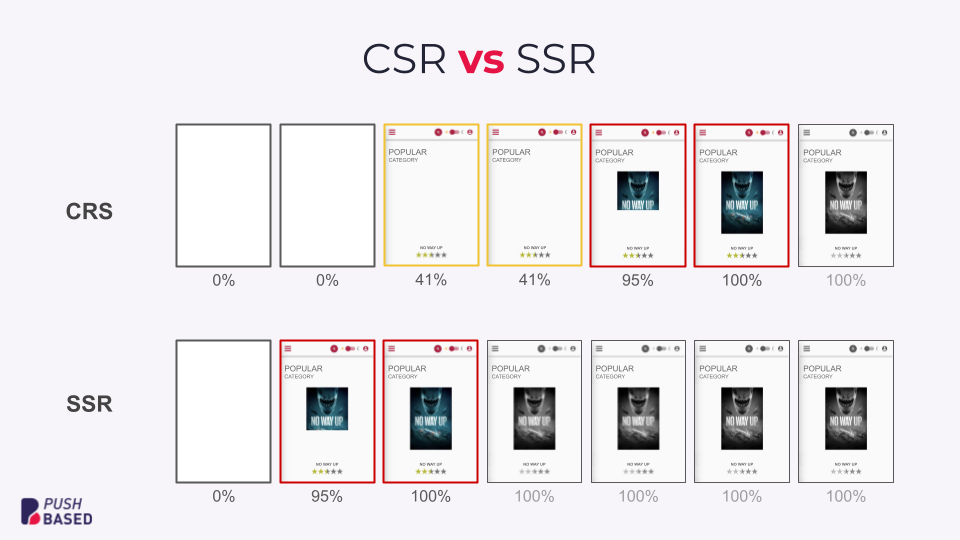
While SSR improves loading speed, it does come with a couple of potential drawbacks:
Delayed interactivity: Even though the page appears sooner, it can take time for the full app to become interactive, and users may notice a delay when first interacting with it.
Potential INP issues: If a user tries to interact with the page while it’s still hydrating, main-thread tasks can block or delay events, resulting in poor INP scores.
This is where incremental hydration makes a difference. By deferring the hydration of less-critical components, you keep the main thread free for critical content and smooth user interactions, directly addressing the issues above.
Interaction to Next Paint (INP) measures interaction latency or, in other words, how quickly a page responds to user inputs like clicks, taps, or keystrokes aggregated over time. If the main thread is busy processing other tasks, users may notice a lag between their actions and any visible response.
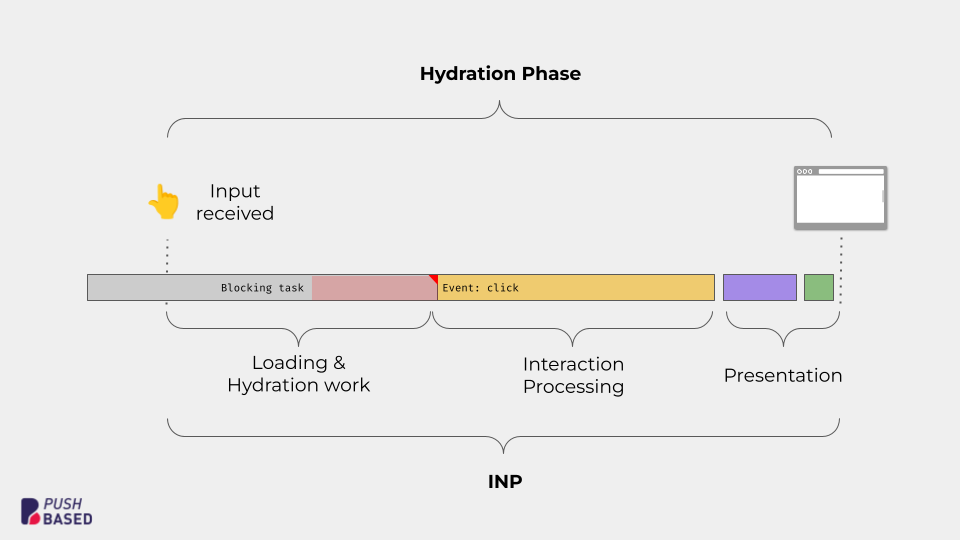
The diagram above shows what happens when a user tries to interact with the page while the app is still hydrating. Hydration tasks take over the main thread, so the browser has to finish those tasks before it can respond to user input. As a result, there’s a noticeable delay in the response.
To solve these latency issues, we can focus on three core strategies or, as I call them, the trinity of performance improvement:
Reduce work
Distribute work
Prioritize work
Incremental hydration puts these strategies into practice. It lets you show the HTML for components before they’re hydrated and delays their JavaScript loading until it’s needed. This keeps the main thread free to handle user events right away, so heavy scripts don’t block immediate interactions.
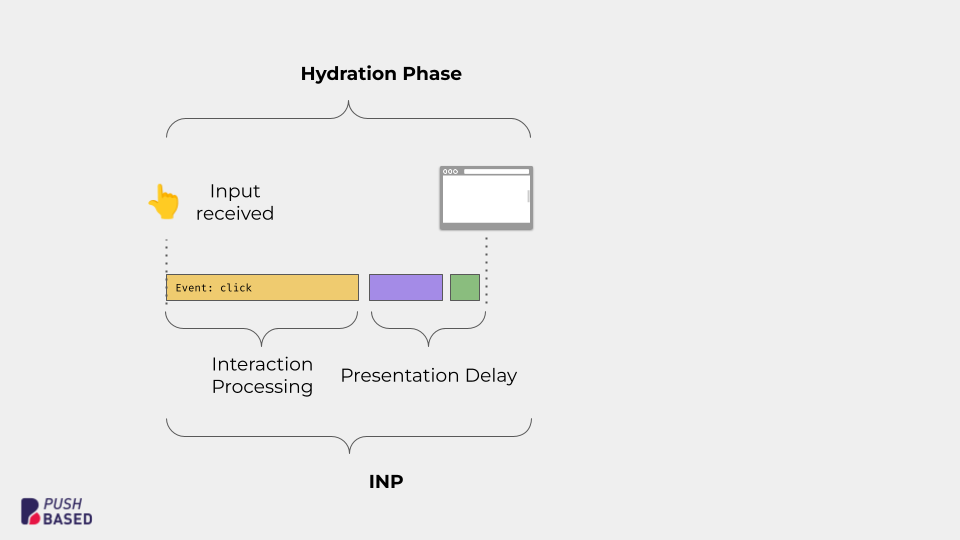
As visualized above, incremental hydration improves INP in three main ways:
No upfront JS loading for deferred components
No initial hydration overhead for parts of the app the user hasn’t interacted with yet
Reliable interaction processing since the main thread isn’t tied up doing unnecessary tasks
All of this results in a more responsive experience, ensuring users can smoothly interact with your application, even if parts of it are still hydrating in the background.
Cumulative Layout Shift (CLS) measures how much the visible content unexpectedly shifts while a page loads. Frequent or large shifts can be disorienting. Imagine clicking a button just as it moves from under your cursor. Traditionally, placeholder elements are used to avoid blank screens, but they can still lead to sudden jumps if not handled carefully.
With the new hydration syntax, Angular can now use the unhydrated DOM as a stable placeholder, unlike with @defer
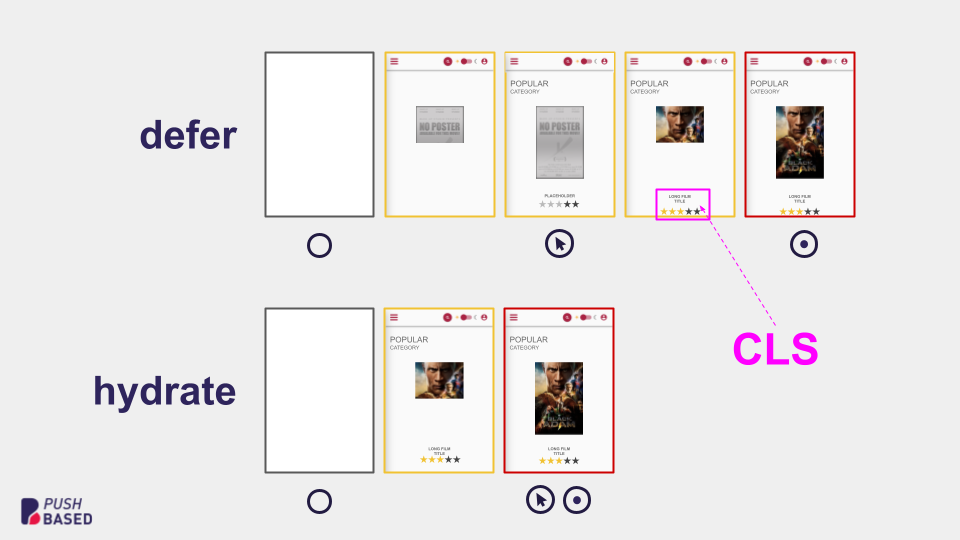
This seamless transition means lower, or even zero, CLS, giving users a polished, stable experience as soon as the page loads.
Incremental hydration is a game-changer for Angular’s performance. By combining server-side rendering with on-demand hydration, you can gain lower LCP, improved INP, and reduced CLS.
In short, incremental hydration sets the stage for smoother, more responsive, and visually stable Angular applications. Stay tuned for Part 3, where we’ll walk through a hands-on example and show you how to implement and fine-tune incremental hydration in your own Angular projects while applying practical hydration patterns.
Intermediate workshop
Master Nx to enforce architecture, speed up your development workflow and improve code quality
Learn more
Accessibility doesn’t have to be hard. Follow a comic-style, hands-on journey building an accessible day selector with Angular Aria, learning comboboxes, listboxes, and real screen reader behavior along the way.

Implement incremental hydration in a real-world Angular app - Basic setup, hydration triggers and important considerations for a seamless integration.

Incremental hydration is a groundbreaking new feature in Angular that heavily impacts critical performance metrics like INP and LCP, while also reducing the effort required to maintain CLS at low levels.

PushBased's 2024 recap: 43 talks, NgGlühwein conference, RxAngular updates, and more. A year of growth, innovation, and community! Read our journey. 🚀

Angular is bridging the gap between the new Signal-Forms architecture and the Template/Reactive Forms. This isn't just a minor update—it’s a fundamental shift in how we author custom form controls.

Profiling is easiest when it's real. Learn how to capture and make sense of CPU profiles in Node.js across scripts, threads, and processes—then apply it to your own projects.